> ## Documentation Index
> Fetch the complete documentation index at: https://codeplugtech.mintlify.site/llms.txt
> Use this file to discover all available pages before exploring further.
# Notification Settings
At BankStmtConverter, configuring notifications helps you stay informed about important events related to your bank statement conversions.
***
## ✅ How to Configure Email Notifications
1. Open **Dashboard → Settings → Notifications**.
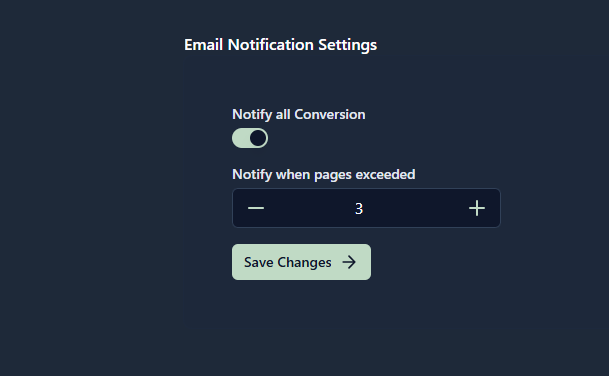
2. In **Email Notification Settings**, you’ll see:
* **Notify All Conversion** (toggle).
* **Notify When Pages Exceeded** (number field with + / – controls).
3. Adjust the settings as needed (see explanation below).
4. Click **Save Changes**.
***
## ✅ What Each Option Does
* **Notify all Conversion (toggle switch on)**
* Sends an email for **every conversion**.
* When ON, the **pages exceeded** setting is ignored.
* **Notify when pages exceeded (number)**
* Works only when **Notify all Conversion is OFF**.
* Sends an email **only if** the uploaded file’s page count is **greater than** the number you set.
* Example: If you set the value to `4`, an email is sent when a file has **5 or more pages**.
***
## ✅ Step-by-Step Procedure
* **Get Notified for Every Conversion**
* Turn **Notify all Conversion → ON**.
* Ignore the page number setting.
* **Result:** Every processed file triggers an email.
* **Get Notified Only for Large Files.**
* Turn **Notify all Conversion → OFF**.
* Set **Notify when pages exceeded → 4**.
* Upload a 3-page file → **no email**.
* Upload a 5-page file → **email sent**.
***
## Reference
> Follow the screenshot above for a visual guide.
1. **When the toggle is turned off** You will receive an email every time your file is processed.
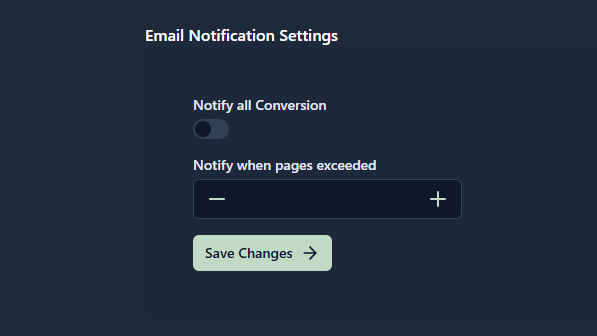 2. **When the toggle is turned on** You will receive an email only when the number of uploaded pages is equal to or exceeds the limit you set (e.g., 3 pages).