Choose files
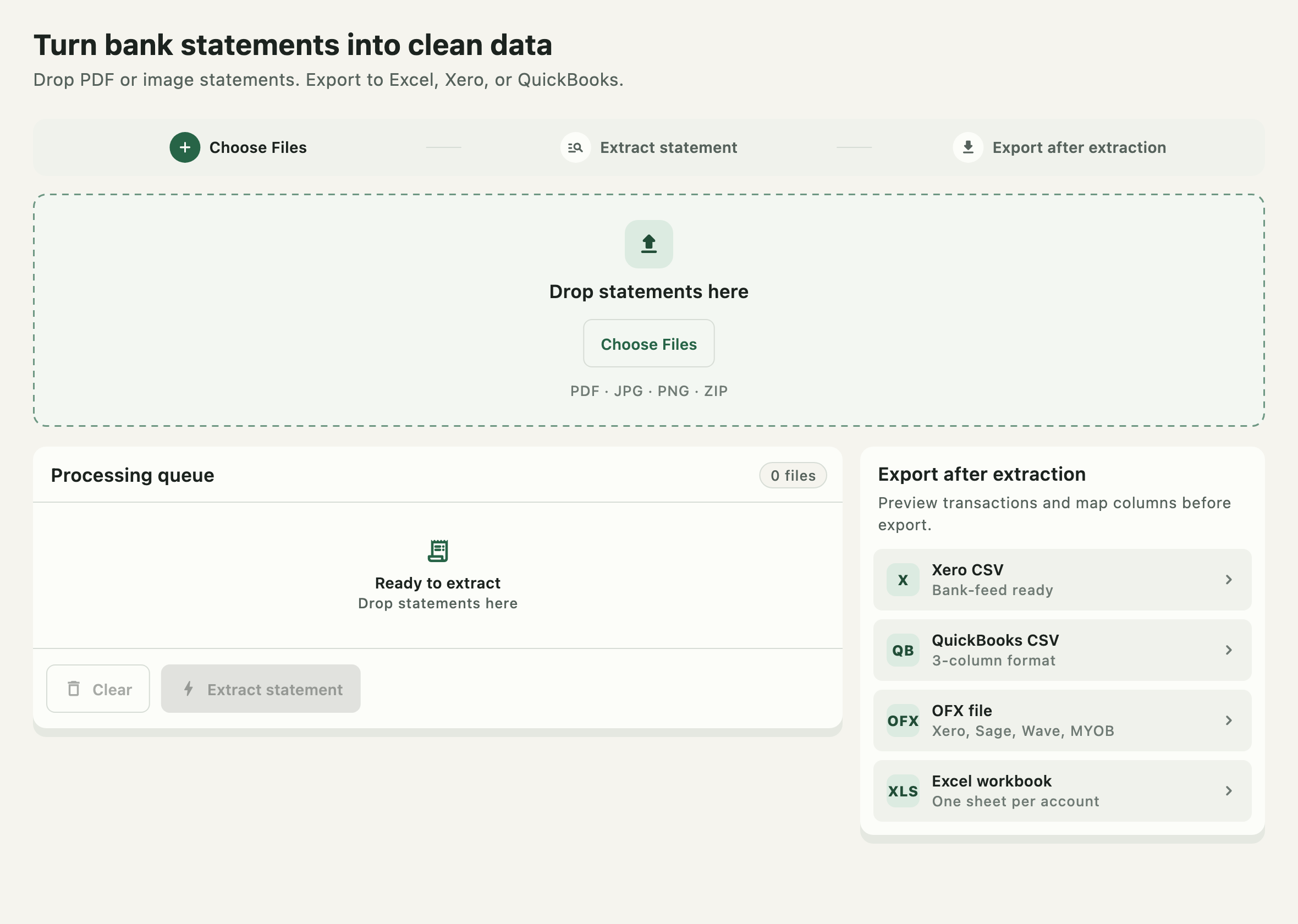
Drop PDF, JPG, PNG, or a ZIP of statements from local storage. Password-protected PDFs are unlocked without uploading anything.
BankStmt Desktop reads PDF and image bank statements and writes clean Excel, Xero, QuickBooks, or OFX files — entirely on your Mac. The statement is not uploaded for conversion.
Training data is a mix of synthetic statements, licensed sample data, and real statements from users who explicitly opted in. Your conversions are never used for it.
You drag a client’s bank statement into a browser tool. It uploads to a server you have never heard of, gets processed somewhere you cannot see, and comes back as a CSV. You have no idea how long that file sits there, who else can reach it, or what happens to it afterwards.
If you have ever signed an NDA, handled a client’s financial records, or simply do not want someone else’s server holding a stranger’s bank data — the upload step is the actual risk. Not the conversion. Not the formatting. The upload.
BankStmt Desktop never uploads your statement. OCR and table detection run on your Mac, and the statement never leaves your machine.
The extraction model
Most converters run a general-purpose document reader and hope it guesses your bank’s layout correctly. The BankStmt extraction model was trained specifically on bank statements — over 1,000,000 of them — so it already knows what a transaction table, a running balance, and a date column look like before it ever sees yours.
That training spans statement formats from the US, UK, Canada, Australia, New Zealand, France, Japan, South Korea, and India — including layouts, date conventions, and non-Latin script that a generic tool was never built to handle.
Your bank format does not have to be the common one. It has to be one the model has actually seen.
None of that training data came from watching your conversions. It is a mix of synthetic statements, licensed sample data, and real statements from users who explicitly opted in to help improve the model. If you do not opt in, what you convert is used for that one conversion, on your machine, and nowhere else.
Inside the desktop app
The application ships with the OCR and table extraction components built in. It reads the statement and writes the exported files without sending the statement to BankStmt Converter.
Drop PDF, JPG, PNG, or a ZIP of statements from local storage. Password-protected PDFs are unlocked without uploading anything.
Built-in OCR reads the statement text locally while table detection identifies transaction rows and their structure.
The app groups detected cells into dates, descriptions, debits, credits, and running balances.
Saves directly to Excel, or generates Xero, QuickBooks, or OFX files — written to the folder you choose on your Mac.
Downloading the installer and activating your license require internet access. Converting a statement does not. Once installed, you can convert statements with your Wi-Fi off.
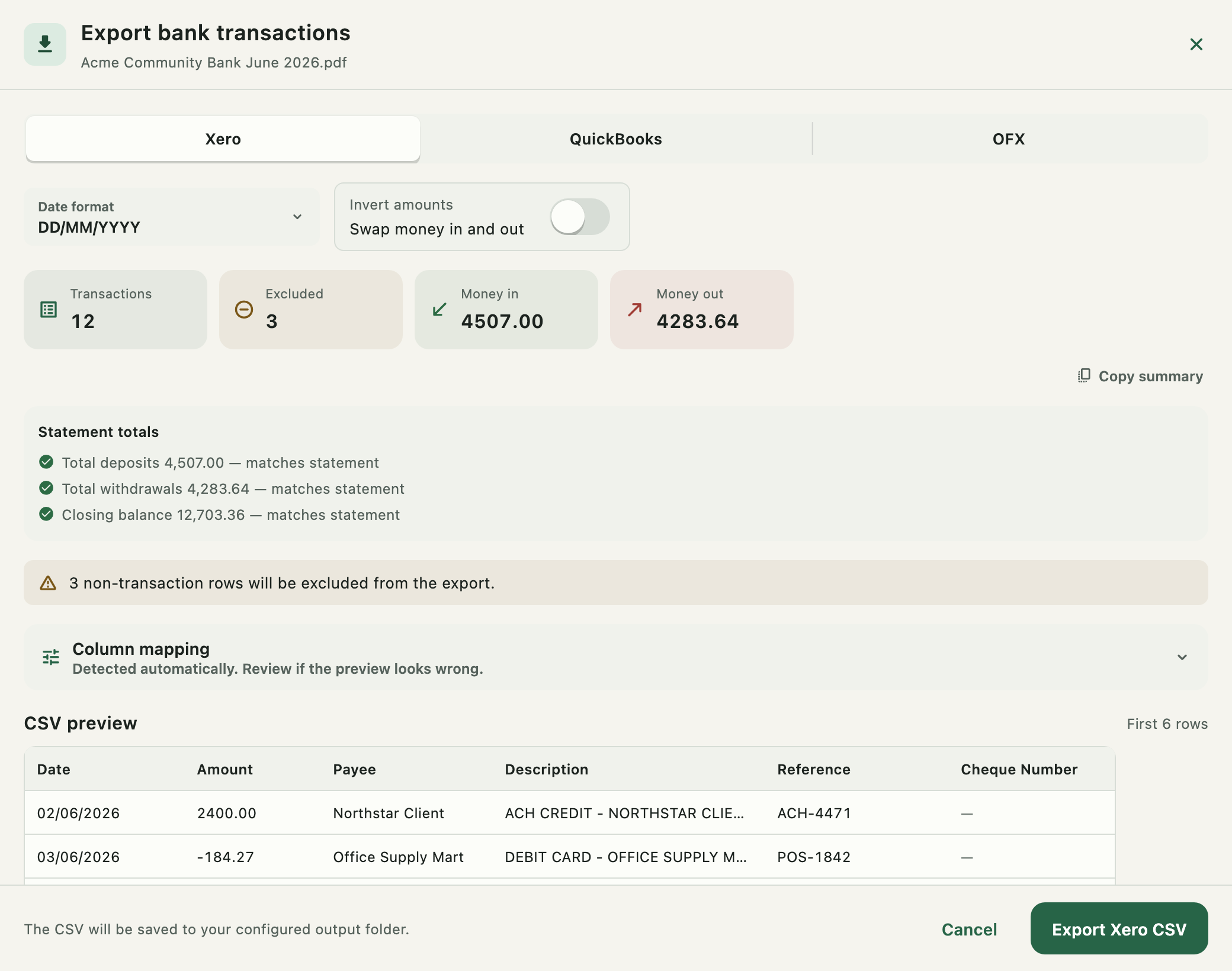
Where your bank prints its own totals — deposits, withdrawals, closing balance — BankStmt Desktop extracts those too and compares them with what it computed from the transactions it found. A green tick means the two numbers agree: the strongest signal that nothing was missed or counted twice.
If a total does not match, the app tells you before export — not after it is already in your books.
You also get a full list of any rows the app excluded — balance lines, repeated headers, blanks — with the reason for each, and a one-click way to include one back in if it should not have been dropped. Review-flagged cells stay visible in the editor; a missing flag is not a guarantee that every cell is correct.
Inside the app
The built-in editor shows what needs attention, lets you correct it, and previews the exact accounting export before writing a file.
Finds transaction regions even when a statement includes headers, footers, summaries, or spans multiple pages.
Any cell the extraction was not confident about is flagged amber, with a running count — so you know exactly what to double-check, not just “trust the whole thing”.
Every structural edit — inserts, deletes, find-and-replace, add-year — is one undo away, and named clearly: “Undo · Delete column C”.
Plain-text replace across every sheet in the workbook, not just the one you are looking at. One undo step if it goes too far.
Banks that print “08 Jun” with no year get completed automatically — enter the statement period once and every dateless row is fixed, including periods that cross New Year.
Xero and QuickBooks CSV, or a full OFX bank-feed file that also imports into Sage, Wave, MYOB, NetSuite, and FreeAgent.
Combine several months into one workbook, or export many statements at once — each using its own remembered column mapping and settings.
See exactly which rows were left out — balance lines, repeated headers, blanks — and why, with a one-click “Include” to overrule it.
Trained on real statement formats from the US, UK, Canada, Australia, New Zealand, France, Japan, South Korea, and India.
The difference is not a promise to delete your statement later. It is that the statement is never sent to BankStmt Converter for extraction in the first place.
Desktop license
The purchase provides a perpetual license for the desktop version and activation on one computer. We email the license key after payment is confirmed.
Need multiple computers, centralized deployment or support for a proprietary statement format? Talk to us about team licensing.
Customer stories
“It just simple, and work. There are tons of products out there offering the same thing, but mostly fail.”
“Smooth and efficient. It really made my job easier. I am thankful to bankstmtconverter for making such a tool.”
“It was simple and easy! I recommend this site to everyone in my job. Thanks!”
Questions before installing
No. The desktop app runs OCR and table detection on your computer and saves the result there. The statement is not uploaded to BankStmt Converter for extraction.
Every accounting export compares its computed totals — deposits, withdrawals, closing balance — against the totals your statement itself prints, and shows a clear pass or fail check before you export. Any cell the extraction was not confident about is flagged amber for review in the built-in editor.
The model is trained on real statement formats from the US, UK, Canada, Australia, New Zealand, France, Japan, South Korea, and India. Layouts vary a lot even within one country, so the model has seen a wide range rather than a single template per bank.
Not yours, and not any customer’s conversions by default. Training data is a mix of synthetic statements, licensed sample data, and real statements from users who explicitly opted in to help improve the model. What you convert stays on your machine and is never added to that training set unless you separately choose to opt in.
Yes. The desktop purchase is a one-time payment for a license that does not expire. It includes 1 year of free updates; after that you can keep using the version you have, or renew updates at the displayed discount.
The trial runs for 1 day from activation and unlocks the desktop app on one computer. No card is required to start it.
No. The macOS installer includes OCR and table detection built in.
Only downloading the installer and activating your license need internet. Extraction itself works fully offline — once installed, you can convert with Wi-Fi off.
Excel workbooks (.xlsx), Xero CSV, QuickBooks CSV, or OFX. OFX also imports into apps including Sage, Wave, MYOB, NetSuite, and FreeAgent.
One Mac per license. You can deactivate on one machine and activate on another if you switch computers. Multi-computer and team licensing is available on request.
Balance lines, repeated headers, subtotal rows, and blanks can be excluded from an accounting export. The app lists each excluded row with its reason and lets you include a valid row back when the data can be parsed.
OCR, table detection, and export all run on your Mac. One-time license, no page credits, no subscription.
92 seats left